
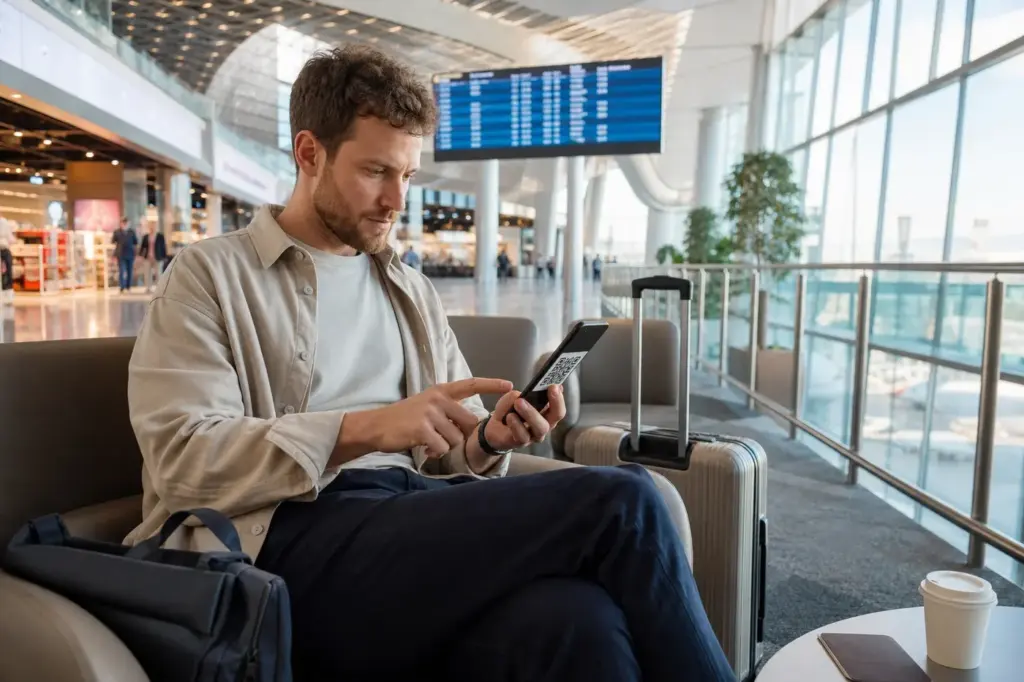
If you’re arriving in Moscow without a way to stay connected, you need to know that buying a local SIM card at the airport is no longer an option for foreign visitors. A physical SIM card needs registration and is no longer easy for visitors to get, so an eSIM is the practical option.
The practical solution for how to get mobile internet in Moscow as a foreign visitor is to purchase an international eSIM before you leave home. This guide explains how to set it up, what to expect when you arrive, and how to stay connected throughout your visit despite current restrictions.
Current access notice: As of October 2026: Russia maintains a 24-hour data block on all foreign eSIMs and roaming SIMs when they first connect to the Russian network. Activating your eSIM at home before arrival bypasses this block. Some eSIM providers route traffic internationally to avoid local network restrictions and blocks; confirm this when selecting a provider.
Quick answer: Buy an international travel eSIM from a provider that covers Russia, activate it at home before your flight (important: this starts your 24-hour availability window), then scan the QR code to install it on your phone when you land. You'll have data within minutes of arriving at the airport. Total time: 5 minutes to install. Cost depends on data plan and duration (typically budget to moderate).
At a Glance
| Total time | 5 minutes to install the eSIM; 30 seconds per data connection after that |
|---|---|
| Typical cost | ₽₽ |
What You Need Before You Start
- An eSIM-capable smartphone (most modern iPhones and Android phones support this)
- A valid email address to receive the eSIM QR code
- International payment method (credit or debit card that works outside Russia)
- A plan for which eSIM provider to use before departure
- Decision on data volume needed (5–10 GB for a short city visit; 15–30 GB for a week)
- Enough time before your flight to activate the eSIM at home
Compare Your Options
| Option | Duration | Price | Notes |
|---|---|---|---|
| International eSIM (recommended) | 5 minutes setup; plan duration varies (3–90 days) | ₽₽ | Activate before departure at home. No physical SIM card, no paperwork. Works on all modern phones. Connect immediately upon landing. Available from providers like OVOSIM, eSIM Pass, HelloRoam, Yesim, Roamix. Data plans typically range from 3 GB for 7 days to 30 GB for 30 days. Most reliable and simplest option for tourists. |
| Hotel or café Wi-Fi only | Setup: immediate at check-in | Free | Free or minimal cost. Limited to indoor locations and hotel network. May require Russian phone number for verification. Slower speeds. Maps and translation apps need offline downloads beforehand. Suitable only for minimal connectivity needs or short stays where you spend most time indoors. |
| International roaming from your home carrier | Depends on activation by your carrier; may be automatic | ₽₽₽₽ | Subject to 24-hour data block on arrival. Extremely expensive in Russia (usually over 10–15 per GB). Your home carrier may have heavily restricted or suspended Russia roaming. Most carriers from Western countries do not offer standard roaming to Russia. Not recommended. |
| Physical Russian SIM card (not viable for tourists) | 30–45 minutes in store plus administration | ₽ | No longer available to foreign tourists without a Russian social security number (SNILS) and Gosuslugi account. Theoretically possible only if you have residency status. Airport SIM kiosks no longer serve foreigners. Do not attempt—operators are legally required to refuse. |
| VPN with international roaming | Download and configure before arrival | ₽₽ | A VPN routed through your home country can bypass some local content restrictions if you use roaming data. However, it does not bypass the 24-hour data block. Not a substitute for data connectivity—you need data first to run a VPN. Useful as an add-on only if you have another primary data solution. |
₽ budget · ₽₽ moderate · ₽₽₽ upscale · ₽₽₽₽ splurge. Price levels are estimates compared with typical prices for visitors.
Step-by-Step Instructions
Step 1: Choose an eSIM provider and plan while still at home
Research international eSIM providers that cover Moscow. Major providers confirmed to work in Russia include OVOSIM, eSIM Pass, HelloRoam, Yesim, and Roamix. Compare their data allowances and validity periods: for a weekend in Moscow, 3–5 GB for 7 days is typical; for a week-long visit, 8–15 GB is safer. Check that the plan covers Russia and Moscow specifically. Complete your purchase and payment before you travel.
Tip: Buy your eSIM at least 24 hours before departure. This gives you time to activate it and resolve any issues before you board.
Step 2: Receive the QR code by email
After purchase, the eSIM provider will send you a QR code and activation instructions by email. Save this email and screenshot the QR code on your phone or computer. Do not delete or lose this—you cannot get it again easily if your first scan fails.
Tip: Forward the email to a backup address or store the screenshot in a cloud service like Google Drive or iCloud so you have access even if your email account has problems.
Step 3: Activate the eSIM at home before your flight
Do this while you're still on your home country's Wi-Fi and your home SIM is working. Go to your phone's Settings > Cellular > Add Cellular Plan (iPhone) or Settings > Network & Internet > SIMs (Android). Scan the QR code from your eSIM provider. When prompted, confirm the plan activation. Your eSIM will now show in your phone's SIM list but may not have full data until you land and connect to the Russian network.
Tip: Activating at home is critical: it starts the 24-hour window during which your eSIM can register on the Russian network. By activating now, your eSIM will already be registered and working when you land, not counting down from when you land.
Step 4: Keep both SIMs active during the flight and airport arrival
Leave your home SIM in your phone alongside the new eSIM (if your phone supports dual SIM). This way you can use your home network or Wi-Fi until you land. When you're ready to use data in Moscow, set your phone to use the eSIM for cellular data in your settings.
Tip: In Airplane Mode, neither SIM works, but that's fine—you'll enable Airplane Mode off once you land anyway.
Step 5: Land in Moscow and enable the eSIM
When you arrive at Sheremetyevo, Domodedovo, or Vnukovo airport, turn off Airplane Mode. Your phone will search for networks and connect to the Russian operator associated with your eSIM (usually Beeline or Tele2, depending on your provider). Go to Settings and select the eSIM as your active data plan. Within seconds you should see 4G coverage.
Tip: If you don't see data immediately, wait 1–2 minutes for the connection to settle. Check your phone's signal bar—you should see 4G or LTE instead of no signal or SOS-only.
Step 6: Test your connection and verify you have data
Open a web browser or maps app and check that pages load. This confirms your eSIM is working. Open your eSIM provider's app (if they have one) to monitor your remaining data balance. Remember that WhatsApp, Instagram, Facebook and some other Western services may be blocked on regular Russian mobile networks, but many eSIM providers route traffic internationally to bypass these blocks.
Tip: Use Wi-Fi at your hotel, airport, café or museum when available to preserve your data allowance. Many public spaces in central Moscow offer free Wi-Fi.
Step 7: Monitor your data usage during your stay
Use your phone's built-in data counter (Settings > Cellular > Cellular Data) or your eSIM provider's app to track how much you've used. Typical daily usage for navigation, messaging and occasional video is 500–800 MB. If you're running low, you can usually buy more data through the provider's app (available with providers like Yesim and HelloRoam) or purchase a top-up bundle.
Tip: Turn off automatic app updates and cloud syncing to avoid surprise data consumption. Download offline maps of Moscow before you arrive if you use Google Maps.
Common Mistakes to Avoid
- Waiting to buy an eSIM until you land at the airport. If you don't activate before departure, your 24-hour window will count down starting from your arrival, and you'll have no data for the first day. Purchase and activate at home.
- Buying an eSIM that does not cover Russia. Some providers no longer offer Russia coverage. Always verify on the provider's website that Russia and Moscow specifically are listed as covered destinations before purchase.
- Assuming airport Wi-Fi will work without a Russian phone number. Most Russian airport Wi-Fi requires SMS verification using a Russian mobile number, which you don't have. Hotel Wi-Fi is usually easier. Plan to use eSIM data or offline maps for the first journey from airport to hotel.
- Forgetting to activate the eSIM on your phone in Settings after landing. Simply connecting to the Russian network isn't enough; you must explicitly select the eSIM as your active data plan in your phone's cellular settings. If you don't, your phone may still try to use your home SIM or have no data.
- Not checking your phone's eSIM compatibility before buying. Older iPhones (pre-iPhone XR) and some budget Android phones do not support eSIM. Verify your phone model supports eSIM before purchasing a plan.
- Expecting to use WhatsApp, Instagram, Facebook or Telegram freely on regular Russian mobile data. These services are blocked on domestic networks. Many eSIM providers route data internationally to bypass these blocks—check this feature when choosing a provider. Hotel and café Wi-Fi usually do not have these blocks.
Tickets, Payment and Booking
Purchase your eSIM online from an international provider before departure. Do not wait until you arrive in Moscow. Most providers accept major international credit and debit cards (Visa, Mastercard). Some accept PayPal or bank transfers. Your home country’s payment card should work; however, confirm the provider accepts payments from your country before buying.
Confirmed working providers for Moscow in 2026: OVOSIM, eSIM Pass, HelloRoam, Yesim, Roamix. These connect to Russian networks (primarily Beeline, MTS, Tele2) and handle 4G coverage across Moscow. Many offer their own apps to monitor data usage and purchase top-ups.
Avoid unofficial resellers or marketplace sellers. Purchase directly from the provider’s official website. Counterfeit or second-hand eSIM codes do not work.
Important: Activate your purchased eSIM at home before your flight using the QR code sent by email. This ensures you have working data when you land, avoiding the 24-hour block that applies to eSIMs first connecting in Russia.
Moscow Vibes Tips
- Download offline maps (Google Maps, Yandex Maps, 2GIS) and offline translation apps before you arrive. This cuts your data use dramatically and lets you navigate even if your eSIM fails or if you're in a dead zone. Moscow metro stations have poor reception—offline maps are essential.
- Buy more data through your eSIM provider's app while you're still in Moscow if you're running low. It's cheaper and faster than hunting for a shop. Most providers allow you to add top-up bundles within hours.
- Keep your home SIM in your phone if possible (dual SIM). You can switch to it if your eSIM fails, and incoming calls from home still work on both SIMs unless you explicitly turn off the home SIM in Settings. This is your backup if something goes wrong.
- Turn off automatic app updates, cloud backup and video autoplay before you arrive. These consume data silently in the background. Moscow public Wi-Fi is common at hotels, cafés, museums and metro stations—use it when available instead of your data allowance.
- Save your eSIM provider's customer support number and email before you travel. If you lose data or have questions on the road, you'll need to contact them. Some providers offer 24/7 chat support within their app.
- Use local Russian maps apps like Yandex Maps or 2GIS instead of Google Maps for better Moscow coverage and offline functionality. Both work with eSIM data and are free.
Explore Nearby How to get mobile internet in Moscow as a foreign visitor
Train stations and river piers near How to get mobile internet in Moscow as a foreign visitor
 Sheremetyevo International Airport
Main image: AI-generated illustration. It may not show the place exactly as it looks.
 Domodedovo International Airport
Main image: AI-generated illustration. It may not show the place exactly as it looks.
 Vnukovo International Airport
Main image: AI-generated illustration. It may not show the place exactly as it looks.
Related guides
 Moscow in 12 Hours: Airport Layover Itinerary: Train, Sights, Timing
Main image: AI-generated illustration. It may not show the place exactly as it looks.
Browse more: All How-To · All SIM and Internet
FAQ
Can I buy a SIM card at Moscow airport if I'm a foreign visitor?
No. As of January 2025, Russian mobile operators require all new SIM cards to be registered to a Gosuslugi government account and linked to a Russian social security number (SNILS). Foreign tourists cannot obtain these documents. Airport SIM kiosks no longer serve foreigners. You must purchase an eSIM before you arrive.
Will I have data for the first 24 hours when I land?
Yes, if you activate your eSIM at home before your flight. The 24-hour block applies only to eSIMs that first connect to the Russian network after arrival. By activating at home, your eSIM registers before you land, so you'll have working data when you step into the airport.
What happens if I activate my eSIM after I land instead of before?
You will have no mobile data for approximately 24 hours. Your eSIM will not connect to data while it's in the 24-hour block window. You'll need to rely on hotel or café Wi-Fi during this time. This is why activation at home is critical.
How much data should I buy for a week in Moscow?
For typical tourist use (navigation, messaging, social media, occasional video), 8–15 GB for 7 days is comfortable. Light users (mostly Wi-Fi, occasional maps) can manage on 5 GB. Heavy users (streaming, video calls, work) should buy 20+ GB. You can purchase additional data through your provider's app if you run out.
Do eSIM plans include phone calls, or only data?
Most tourist eSIM plans include data only, not voice calls. If you need to make or receive calls, you can use voice apps like WhatsApp, Viber or Skype over the data connection (though WhatsApp is blocked on regular Russian networks; some eSIM providers bypass this). Check your provider's plan details.
Will my home phone number still work while I have an eSIM?
If your phone supports dual SIM (most modern iPhones and Android phones), yes. Keep your home SIM installed alongside the eSIM. You can switch which one handles data and voice in Settings. Incoming calls to your home number will still ring if that SIM is active. This also gives you a backup if your eSIM fails.
Can I use WhatsApp, Instagram, Facebook and Telegram in Moscow?
These services are blocked on regular Russian mobile networks. However, many international eSIM providers route traffic internationally to bypass local blocks, so they may work depending on which provider you choose. When selecting an eSIM, check whether the provider routes traffic internationally or uses local Russian networks only. Hotel and café Wi-Fi often bypass these blocks.
What if my phone doesn't support eSIM?
Most iPhones from iPhone XR onwards support eSIM, as do most modern Android flagships. Older or budget phones may not. Check your phone's specifications before buying an eSIM. If your phone doesn't support eSIM, you'll need to use hotel Wi-Fi or international roaming from your home carrier (expensive and may not work from Russia).
Discover More of Moscow with Our Travel Tips
Get practical Moscow travel tips, new destination guides and useful updates on attractions, opening hours and prices. Plan your visit with clear, helpful information delivered to your inbox.
Moscow Vibes is a one-person project. A coffee keeps it going
Not legal advice. This is general information for visitors. Rules on visas, entry, registration, customs and similar matters change often and can depend on your nationality. Check the official source and, if in doubt, ask your embassy or a qualified adviser.
Looking for more on this? Journey: Cihangir Cafe for Breakfast, Pizza and Late Evenings (Istanbul Vibes)

Take this guide with you
Get a free PDF of this guide to print or read offline: key facts, tips and a map link on a few clean pages.
Report an issue on this page
Paying for your trip: please read
Payments and bookings between Russia and many other countries are currently restricted. In practice, cards issued in the EU, the UK, the US and several other countries often cannot be used in Russia, Russian cards usually cannot be used abroad, and some booking platforms, airlines and payment providers limit or pause their services for Russia. The situation changes frequently.
We do not give legal or financial advice, and this site does not encourage anyone to break any rule that applies to them. Whatever you plan, you are responsible for following the laws and regulations that apply to you, including those of your country of residence and citizenship.
Many travelers still organise their stay without problems. It is worth asking your bank or payment provider what is currently possible, contacting hotels, tour operators and carriers directly about the payment methods they accept, and checking which services are open to customers from your country. Clarify payment, cancellation and refund terms before you commit to a booking, and keep your plans flexible.
Partner links on this site may not be available in every country, and prices, availability and rules in our guides can differ from what you see when you book.
How we research and update our guides
About this guide: AI assistance and accuracy
This guide is created with the help of AI and is based on official sources where available. Mistakes can still happen. Opening hours, prices, rules and other details are given to the best of our knowledge as of the date shown and can change without notice. It offers general recommendations only, not professional, legal or travel advice. Please confirm important details with the official source before you travel; you are responsible for your own plans and decisions.
* Affiliate link: as an Amazon Associate we earn from qualifying purchases at no extra cost to you.