
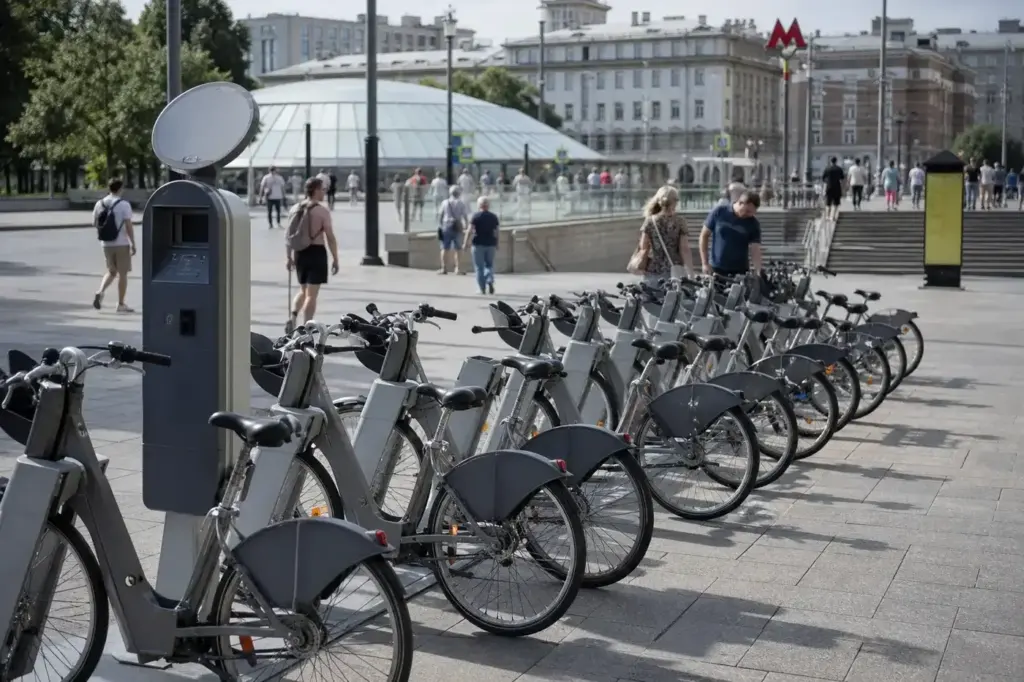
Velobike, Moscow‘s public bike-sharing system, offers an affordable and flexible way to explore the city on two wheels. Whether you want to ride through parks, travel between metro stations, or cover short distances without public transport, the system is designed for visitors and locals alike.
This guide explains how to register, unlock your first bike, and navigate the rental process. The recommended approach is to register online before you arrive or use the mobile app on-site, then unlock bikes with your PIN at any of the hundreds of docking stations throughout the city. Altogether, from registration to your first ride takes about 10–15 minutes.
Quick answer: Register for Velobike using the website, mobile app, or station terminal with your name, email, phone number and a Russian-issued bank card. Purchase a 24-hour pass at the station or app. Find a bike at any of over 700 stations, enter your login and PIN on the keypad, and ride. Return the bike to any station and you're done. Total time: 5–10 minutes per transaction; cost: ₽ per day pass (includes 30 minutes of riding).
At a Glance
| Total time | 5–10 minutes per rental (registration is a one-time task; subsequent rentals take 2–3 minutes) |
|---|---|
| Typical cost | ₽ |
What You Need Before You Start
- Valid passport or ID
- Mobile phone number (to receive login and PIN via SMS)
- Bank card (Visa, Mastercard, or MIR)
- Helmet (recommended but not provided; bring your own)
- Basic fitness (standard bikes require pedalling; e-bikes have motor assist)
Compare Your Options
| Option | Duration | Price | Notes |
|---|---|---|---|
| Velobike 24-hour daily pass | Valid for 24 hours from purchase | ₽ | Unlimited rides within 24 hours. Each ride up to 30 minutes is free; rides longer than 30 minutes incur an additional charge. Must wait 15 minutes between rentals for system synchronisation. Best for first-time users and day visitors. |
| Velobike monthly pass | Valid for 30 days from purchase | ₽₽ | Unlimited rides for one month. Same 30-minute free ride rule applies. Good value if staying in Moscow for a week or longer and plan to bike regularly. Available April to October. |
| Velobike seasonal pass (April to October) | Valid from April 25 to October 31 | ₽₽ | Full-season access across the entire operating period. Best for residents or long-term visitors. Covers the entire cycling season with unlimited rides and the same 30-minute inclusion. |
| Private bike rental companies | Varies by company (typically hourly, daily or multi-day) | ₽₽₽ | Independent rental shops offer standard and e-bikes with longer rental periods (overnight, multi-day). Useful if you want to keep a bike for more than 48 hours (Velobike's maximum without additional charges) or need a specific bike type. Found throughout central Moscow. |
| Electric scooter rental (alternative) | Typically rented per minute | ₽ | Shared e-scooters operate via mobile apps and are an alternative to bikes for short distances. Fast and convenient for last-mile travel, but less suitable for long rides or parks. Available year-round in many Moscow areas. |
₽ budget · ₽₽ moderate · ₽₽₽ upscale · ₽₽₽₽ splurge. Price levels are estimates compared with typical prices for visitors.
Step-by-Step Instructions
Step 1: Register on Velobike before arrival
Visit velobike.ru or download the Velobike mobile app (available on App Store and Google Play). Enter your first name, last name, email address and mobile phone number. You will receive a login and 4-digit PIN via SMS. Alternatively, register at a rental station terminal on arrival, though the website or app is faster for tourists with smartphones.
Tip: Register at home before your trip so you can rent immediately upon arrival at a station.
Step 2: Select and pay for your access plan
Log into your Velobike account using your login and PIN. Choose a 24-hour pass (valid from purchase time for exactly 24 hours), a 30-day pass, or a full-season pass (April to October). Payment is by Russian-issued bank card only; cards issued outside Russia do not work and no cash is accepted. The system will authorise your card but only charge when you complete a rental.
Tip: For a one-time ride, buy the 24-hour pass. If you plan multiple rides, the daily pass allows unlimited rides with 15-minute breaks between them.
Step 3: Locate a bike station near you
Open the Velobike app or website map to find the nearest docking station. Stations have electronic displays showing how many bikes and free docks are available. Look for grey bikes in metal racks at the station. Stations are located near metro exits, parks, and on major routes throughout central Moscow and suburban areas.
Tip: Check the map before heading to the station to confirm bikes are in stock. Busy times (evening rush hour, weekends) may have fewer available bikes.
Step 4: Inspect the bike and enter your credentials
Choose a bike from the rack and examine it quickly: check brakes, tyres and the general condition. Press the OK button on the bike's keypad. Enter your login number (usually your card number), then press OK. Enter your 4-digit PIN, then press OK again. Wait for a beep and the display to show 'Safe trip'.
Tip: If the bike feels unsafe, press the red button to reject it and choose another. Damaged bikes will not unlock.
Step 5: Remove the bike and pull away
Once you see 'Safe trip', the bike will release from the magnetic dock. Pull it straight out toward you. The bike is now yours for the duration of your access plan. The first 30 minutes of your ride are included; after that, additional charges apply.
Tip: Do not delay—the bike will lock again after about 20 seconds if you do not remove it in time.
Step 6: Ride and follow traffic rules
Ride on dedicated bike lanes where available, or on the road following Moscow traffic rules. Moscow has hundreds of kilometres of bike paths, many along embankments and through parks. Keep to the right side of the lane and obey traffic signals. Do not ride on pavements.
Tip: Evening rides (6–10 pm) are most popular and bike lanes are busiest; early morning offers a quieter experience.
Step 7: Find any Velobike station to return your bike
Locate any operating Velobike station using the app. Return stations must have free docks for bikes of your type (standard or e-bike). Approach the station and look for empty spaces in the racks. Position your bike dock and press OK on its keypad. Place the bike firmly into an empty dock until you hear a beep.
Tip: If all docks are full, use the app map to find another station with free slots. Never leave a bike outside a station or on public bike parking.
Step 8: Confirm the return and receive confirmation
Wait for the display to show 'RETURN OK' (or 'КОНЕЦ' for e-bikes) and listen for a beep—one beep means success, three beeps mean an error. You will receive an SMS confirmation to your registered phone number. Check this message to confirm the return was logged correctly.
Tip: If you do not see 'RETURN OK' on the screen, the return may not have registered. Check your SMS; if the bike was not returned, contact support or return it to another station.
Step 9: Keep your bike locked after return
Once you have seen 'RETURN OK', the bike is locked back into the dock and no longer your responsibility. Walk away. If you rented a 24-hour or multi-ride pass, you can rent another bike immediately after a 15-minute break.
Tip: Do not attempt to move the bike after return; it is now locked and part of the system inventory.
Common Mistakes to Avoid
- Forgetting to remove the bike within the 20-second window after pressing OK—the bike will lock back and you must start over.
- Returning the bike to the wrong dock type (e.g. putting a standard bike in an e-bike-only dock)—you will be fined and your account may be blocked temporarily.
- Not confirming the 'RETURN OK' message—if you leave without seeing it, the system may not register the return and you could be charged for an extended rental.
- Trying to dock a bike at a station with no free slots—the app will not allow you to proceed. Always check the map for available docks before riding to a return station.
- Attempting to keep a bike for longer than 48 hours—a fine of thousands of roubles will be deducted from your card. If you need a bike for longer, use a private rental company.
- Leaving a bike on public bike parking or street racks instead of a Velobike station—this is not recognised as a return and you remain liable for the rental.
Tickets, Payment and Booking
Official registration and payment: Register at velobike.ru, via the Velobike mobile app (App Store, Google Play), or at a station terminal. No advance booking is required; registration takes 5–10 minutes on site or before arrival.
Payment methods: Bank card only (Visa, Mastercard, or MIR). No cash accepted. A card authorisation (temporary hold) will be placed on your account to cover any overages or damage.
Foreign visitors: Cards issued outside Russia do not work, so registration is not practical without a Russian-issued bank card and phone number. Your card must support online transactions; some cards with 3D Secure may require additional verification. Check with your bank before arrival.
Avoid resellers and unofficial apps: Register only on the official Velobike site or app to ensure you receive the correct pricing and support. Do not share your login or PIN with others. Only one bike per account at a time.
Moscow Vibes Tips
- Book your first bike early in the day (8–11 am) when stations are less crowded and more bikes are available. Evening rush hour (6–10 pm) and weekends see peak usage.
- Use the app map to plan a route with multiple station options. If your destination station is full, you can see alternative nearby stations and navigate there instead.
- Standard Velobike bikes are heavy and sturdy; they require some physical effort, especially on hills. E-bikes offer motor assist for a small additional fee and are ideal if you're fatigued or covering longer distances.
- If a bike is damaged (flat tyre, bent wheel, broken brakes), do not ride it. Return it immediately without pressing OK to reject it. Call the support number on the station to report damage.
- Keep your SMS with your login and PIN for the entire season. If you forget them, you can request a new PIN from the website or app login page using your email.
- Most bike stations have a map posted on site; take a photo with your phone to reference station locations and bike availability without relying on the app all day.
Explore Nearby How to use Moscow bike sharing as a tourist
Related guides
 Moscow Metro Tour: Most Beautiful Stations Itinerary: 5 Stations
Main image: AI-generated illustration. It may not show the place exactly as it looks.
 Gorky Park, Muzeon and Krymsky Val Walking Itinerary: Route and Tips
Main image: AI-generated illustration. It may not show the place exactly as it looks.
 VDNKh Moscow: Half-Day Walking Itinerary: Route, Fountains and Tips
Main image: AI-generated illustration. It may not show the place exactly as it looks.
 Moscow City and Moscow River Skyline Itinerary: Towers, Bridge, Boat
Main image: AI-generated illustration. It may not show the place exactly as it looks.
 Kuskovo Estate Moscow: Half-Day Itinerary: Palace, Pavilions, Park
Main image: AI-generated illustration. It may not show the place exactly as it looks.
Browse more: All How-To · All Other
FAQ
Can I use my Moscow Troika transport card to rent a bike?
Yes, if your Troika card is already registered in the Velobike system, you can use it to unlock bikes instead of entering your login and PIN. This is convenient if you use the card for metro and bus travel. To link it, register online first, then associate your Troika card in your Velobike account settings.
What happens if I keep a bike longer than 30 minutes?
Each access plan includes 30 minutes of riding. If your ride exceeds 30 minutes, an additional charge per minute is automatically deducted from your registered card. To avoid this, return the bike after 30 minutes, wait at least 15 minutes, and rent another bike—all rides within your 24-hour pass will start with a fresh 30-minute allowance.
Is Velobike available in winter?
No. Velobike operates only from approximately April 25 to October 31 each year. The system shuts down in November and reopens in spring. If you visit in winter, use private bike rental companies, taxis or public transport instead.
Can I rent a bike if I am a tourist without a Russian phone number?
Yes. You can use any international mobile phone number with SMS capability. When registering, enter your phone number and you will receive your login and PIN via SMS to that number. Ensure your phone plan includes SMS from Russia or use WiFi calling or an eSIM; a physical Russian SIM needs registration and is no longer easy for visitors to get.
What is the difference between standard and e-bikes?
Standard Velobike bikes are pedal-powered and heavier. E-bikes have a motor that provides pedal assist—the motor boosts your pedalling effort, making uphill rides and longer distances easier. E-bikes are available at select stations and cost the same as standard bikes; the price is not higher.
Can I ride a bike at night or in the dark?
Yes. Velobike operates 24/7 during its season, so you can rent a bike at any time, day or night. However, ensure the bike has working lights (most do) and wear visible clothing. Moscow bike lanes are generally lit in central areas but darker in suburban zones.
What if I damage or lose a bike?
Damage or loss is the renter's responsibility. The card authorisation (hold) placed on your account when you register covers minor issues. Serious damage or theft will result in substantial charges to your card. Always return the bike to a Velobike station, not abandoning it anywhere, to avoid liability.
Can my friend and I share one Velobike account?
No. Each account allows only one bike at a time. If you are riding together, each person must have their own Velobike account and a separate access pass. This ensures the system tracks each bike individually.
Discover More of Moscow with Our Travel Tips
Get practical Moscow travel tips, new destination guides and useful updates on attractions, opening hours and prices. Plan your visit with clear, helpful information delivered to your inbox.
Moscow Vibes is a one-person project. A coffee keeps it going
Get a free PDF of this guide to print or read offline: key facts, tips and a map link on a few clean pages.
Take this guide with you
Report an issue on this page
Paying for your trip: please read
Payments and bookings between Russia and many other countries are currently restricted. In practice, cards issued in the EU, the UK, the US and several other countries often cannot be used in Russia, Russian cards usually cannot be used abroad, and some booking platforms, airlines and payment providers limit or pause their services for Russia. The situation changes frequently.
We do not give legal or financial advice, and this site does not encourage anyone to break any rule that applies to them. Whatever you plan, you are responsible for following the laws and regulations that apply to you, including those of your country of residence and citizenship.
Many travelers still organise their stay without problems. It is worth asking your bank or payment provider what is currently possible, contacting hotels, tour operators and carriers directly about the payment methods they accept, and checking which services are open to customers from your country. Clarify payment, cancellation and refund terms before you commit to a booking, and keep your plans flexible.
Partner links on this site may not be available in every country, and prices, availability and rules in our guides can differ from what you see when you book.
How we research and update our guides
About this guide: AI assistance and accuracy
This guide is created with the help of AI and is based on official sources where available. Mistakes can still happen. Opening hours, prices, rules and other details are given to the best of our knowledge as of the date shown and can change without notice. It offers general recommendations only, not professional, legal or travel advice. Please confirm important details with the official source before you travel; you are responsible for your own plans and decisions.
* Affiliate link: as an Amazon Associate we earn from qualifying purchases at no extra cost to you.