
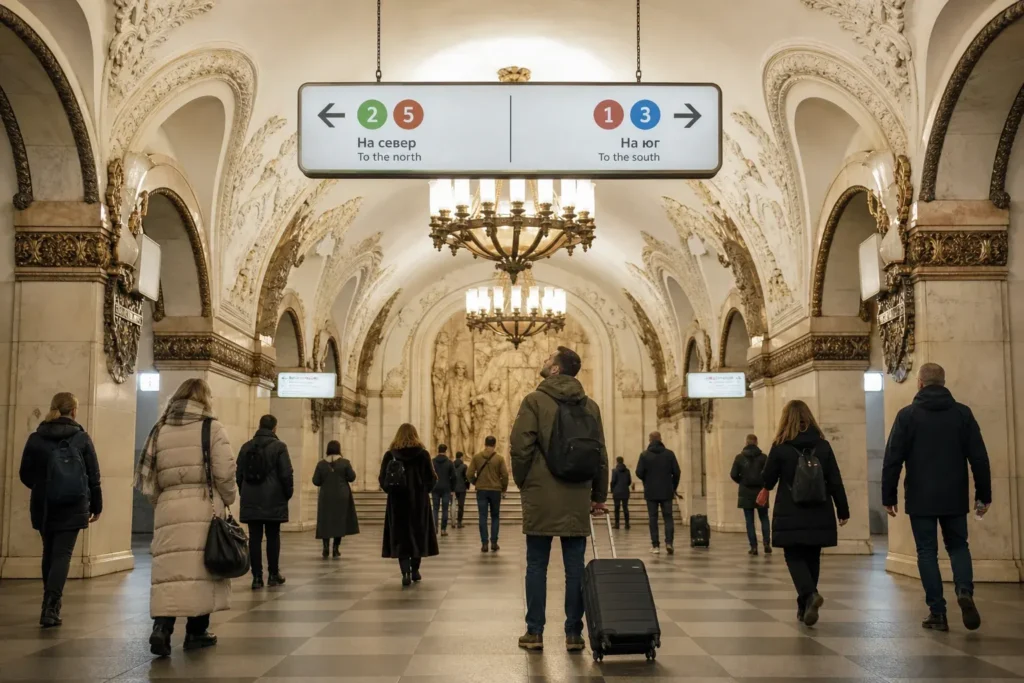
This guide explains how to read Moscow Metro maps and signs, for travelers who do not read Cyrillic and want to find the right platform, the right transfer and the right exit. The system looks complicated at first, but it follows a few simple rules: each line has a number and a color, and the direction of a train is named by its last station.
The recommended way is to carry a map with Latin names, know your line and its last station, and follow the colored signs. Signs in English exist, but not at every station.
Quick answer: Know your line's number, color and last station; follow the colored overhead signs and the floor stickers for transfers, count the stops on the map in the car, and choose a numbered exit before you go up.
At a Glance
| Total time | A few minutes to read the route before you go; a simple change of lines adds 5 to 10 minutes |
|---|---|
| Typical cost | Free: the maps and the signs cost nothing, and the apps were reported as free to download |
| Last updated | Oktober 7, 2026 |
What You Need Before You Start
- A map of the Metro with Latin names, saved offline on your phone or printed
- The name of your start and end stations, in Latin script and, if possible, in Cyrillic
- The number, color and last station of each line on your route
- Time to read the signs without rushing in the crowd
- A navigation app such as Yandex Metro, if you can install it
Compare Your Options
| Option | Duration | Price | Notes |
|---|---|---|---|
| Offline photo of the map with Latin names | Immediate | Free | The simplest option, and it works without data. Take it before you go underground. Match the names with the signs. |
| Yandex Metro app | A minute to set up | Free to download (not verified) | Guides describe it as the most reliable navigation app, with a map in Latin transliteration, route planning with transfers and the best car for the exit. Needs a phone that can install it. |
| The official Metro app | A minute to set up | Free to download (not verified) | Has an English interface, with rough translations according to a guide, a route planner, the status of the lines and station information. Some functions need a Russian bank account. |
| Printed bilingual map | Immediate | Free at stations and hotels (reported) | Available at information booths and many hotels. Good for matching Latin and Cyrillic names. |
| Ask the staff | A few minutes | Free | Staff at the information booths may not speak English, so show the station name written down, or on your phone. |
Step-by-Step Instructions
Step 1: Get a map with Latin names
Take a photo of the Metro map, or save an offline map with the station names in Latin script and, if possible, in Cyrillic too. Maps are posted at each station and inside each train car, and many stations and hotels have bilingual copies. Guides recommend an app such as Yandex Metro, which shows the map in Latin transliteration and calculates routes with transfers, and its use needs a phone with data.
Tip: Carry a map in both scripts, since it helps you match the names on the signs.
Step 2: Know your line and its last station
Each line has a number and a color, for example the Ring Line is line 5 in brown, the Arbatsko-Pokrovskaya Line is line 3 in blue. Moscow residents use the colors more than the long names. On the map, find your line, and note the last station in the direction you want, since signs and announcements name the direction by that final stop.
Tip: Write the line number, the color and the last station on a note.
Step 3: Check the station name at the entrance
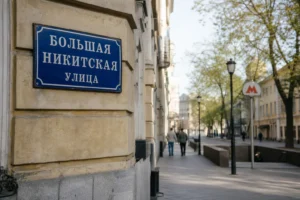
Look for the red letter M. The names of the stations are written in Cyrillic and in Latin letters, though some pavilions have the name in Russian only. One entrance can lead to several stations of different lines, which may have different names, and a new sign may list the names and the line numbers. Check that you enter the station of your line.
Tip: If an entrance lists several names, find the one on your route.
Step 4: Follow the signs in the hall and on the platform
Overhead signs in the hall show the line colors and numbers, and which way to go for each line. On the platform, a sign gives the next stations in each direction, so you can see which way leads to your last station. Large colored stickers on the floor mark the places where you change lines. Guides say that the signs are in Russian and English, but not at all stations.
Tip: Match the color and the number, not just the words.
Step 5: Read the map in the train
Inside each car, near the doors, there is a map of the whole Metro and a map of the line you are on, with a translation into English according to guides. Announcements are made in Russian and English, and on the radial lines a male voice indicates the direction toward the center, and a female voice the opposite, according to one guide. If you cannot read the names, count the stops on your map or in your app.
Tip: Count the stops before you board, so you know when to stand up.
Step 6: Change lines by color
At a transfer station, leave the train and follow the hanging signs that show the number and color of the line you need. A transfer may involve stairs and long passages, and the transfer station may have a different name on each line, so check the name on the map. Large stations may have an information board with a plan of the passages.
Tip: Look at the floor stickers if the hanging signs are crowded.
Step 7: Choose the exit before you go up
Exits are numbered, and many stations have several, leading to different streets. Look at the plan of the neighborhood at the exit or in the hall, which shows the streets and the main sights near each exit number. Overhead signs at the exits list nearby streets and landmarks, often in English near the center. Choose the exit before you climb the escalator, since a wrong one can mean a long walk.
Tip: Check the exit number on your map app before you leave the platform.
Common Mistakes to Avoid
- Waiting for an English sign on every overhead board: sources say that direction signs are in English at the main stations but not at all of them, so follow the colors and the numbers.
- Going down the wrong entrance: one entrance can serve several stations of different lines, so check the name of the station of your line.
- Looking for the name of the transfer station on the line you want: transfer stations have different names on different lines, so check the map.
- Choosing the direction by the next station only: use the last station of the line, as the signs and announcements do.
- Taking the wrong direction on the Ring Line: it is a circle, so check which neighbor station the sign shows on the platform side you stand on.
- Climbing out without checking the exit: exits are numbered and lead to different streets, so choose before you go up.
- Depending on mobile data in the tunnels: download the map and the app's data before you go underground.
Tickets, Payment and Booking
Maps and signs cost nothing: maps are posted at each station and in each car, and bilingual copies are available at information booths and many hotels. The official Metro site, mosmetro.ru, is reported to be in Russian only, since its English version has been down for years, but a browser can translate it, and it has an interactive map.
- Apps: Yandex Metro gives a map in Latin transliteration; the official Metro app has an English interface; whether they work for you depends on your phone and your region, and some functions need a Russian bank account.
- Tickets and payment: the fares, the Troika card and the payment problems for foreign cards are explained in the ticket guide of this site.
Check the current official information on mosmetro.ru.
Helpful Links
Compare hotel pricesSearch flights
Advertisement: these are partner links. If you book or buy through them, we may earn a commission at no extra cost to you.
Moscow Vibes Tips
- The Ring Line is the key to the system, since all its stations are transfer stations that link the radial lines; use it to change between lines.
- Take a photo of the platform sign that shows the next stations, so that you can check the direction later.
- At Kiyevskaya the same name covers three stations, on lines 3, 4 and 5; check the color before you change.
- Around the Kremlin, guides say the stations and passages have detailed plans of the district, showing the sights and the exits that lead to them.
- Press the help button at the platform edge or in the car only in an emergency; the cars have a panic button, according to a guide.
- If you miss your stop, get off at the next one and take the train back; the trains run often, according to a guide.
Explore Nearby How to read Moscow Metro maps and signs
Sights near How to read Moscow Metro maps and signs
 Moscow Metro · typical visit: 1.5–3 hours for a tour of showcase stations
Main image: AI-generated illustration. It may not show the place exactly as it looks.
Metro stations near How to read Moscow Metro maps and signs
 Kiyevskaya Metro Station
Main image: AI-generated illustration. It may not show the place exactly as it looks.
 Kurskaya Metro Station
Main image: AI-generated illustration. It may not show the place exactly as it looks.
 Chkalovskaya Metro Station
Main image: AI-generated illustration. It may not show the place exactly as it looks.
Related guides
 How to use the Moscow Metro as a tourist: Tickets, Fares and Lines
Main image: AI-generated illustration. It may not show the place exactly as it looks.
 How to buy a Moscow Metro ticket: Troika Card, Machines and Cash
Main image: AI-generated illustration. It may not show the place exactly as it looks.
 How to read Cyrillic quickly as a traveler: Letters, Words and Signs
Main image: AI-generated illustration. It may not show the place exactly as it looks.
 How to avoid rush hour in the Moscow Metro: Peak Times, Busy Stations
Main image: AI-generated illustration. It may not show the place exactly as it looks.
 How to use the Moscow Central Circle (MCC): Fares, Hours and Transfers
Main image: AI-generated illustration. It may not show the place exactly as it looks.
Browse more: All How-To · All Metro and Trains
FAQ
Are there English signs in the Moscow Metro?
Yes at most main stations, but not everywhere. Station names are written in Cyrillic and Latin letters, and floor and exit signs often have English.
How do I know which direction to take?
By the last station of your line, shown on the signs and in the announcements, and by the next stations on the platform sign.
What do the line colors mean?
Each line has a number and a color. The Ring Line is line 5 in brown; residents use the colors more than the names.
Which app is best for the Metro?
Guides describe Yandex Metro as the most reliable, with a map in Latin transliteration. The official app has an English interface.
Are the announcements in English?
Yes, according to a 2026 guide, announcements are made in Russian and English, and on radial lines a male voice means toward the center.
What if I take the wrong train?
Get off at the next station and change, since the trains run often. Check the map in the car to see where you are.
Why do transfer stations have different names?
Stations of different lines that connect often have different names, for example the stations at one interchange. Check your map for the names.
How do I choose an exit?
Look at the neighborhood plan or the exit signs, which list streets and sights by exit number, and choose before you go up.
* Affiliate link: as an Amazon Associate we earn from qualifying purchases at no extra cost to you.
Discover More of Moscow with Our Travel Tips
Get practical Moscow travel tips, new destination guides and useful updates on attractions, opening hours and prices. Plan your visit with clear, helpful information delivered to your inbox.
Moscow Vibes is a one-person project. A coffee keeps it going
Last updated: October 7, 2026.
How we research and update our guides
About this guide: AI assistance and accuracy
This guide is created with the help of AI and is based on official sources where available. Mistakes can still happen. Opening hours, prices, rules and other details are given to the best of our knowledge as of the date shown and can change without notice. It offers general recommendations only, not professional, legal or travel advice. Please confirm important details with the official source before you travel; you are responsible for your own plans and decisions.
International sanctions affect payments between Russia and many other countries. In practice, cards issued in the EU, the UK, the US and several other countries often do not work in Russia, Russian cards usually do not work abroad, and some booking platforms, airlines and payment providers limit or suspend their services for Russia. The situation changes frequently. We do not give legal or financial advice, and this site does not encourage anyone to break or circumvent sanctions. Whatever you plan, you are responsible for following the laws and regulations that apply to you, including those of your country of residence and citizenship. Many travelers still organise their stay lawfully. It is worth asking your bank or payment provider what is currently permitted, contacting hotels, tour operators and carriers directly about the payment methods they accept, and checking which services are open to customers from your country. Clarify payment, cancellation and refund terms before you commit to a booking, and keep your plans flexible. Partner links on this site may not be available in every country, and prices, availability and rules in our guides can differ from what you see when you book.Paying for your trip: please read
Report an issue on this page

Take this guide with you
Get a free PDF of this guide to print or read offline: key facts, tips and a map link on a few clean pages.